What is a video podcast? A complete guide for creators
August 1, 2025
Already podcasting? Already filming? Here’s how to bring your show to life with video on Spotify, grow, earn, and connect.
Expand for key takeaways:
Once upon a time, when you heard the word “podcast,” your brain immediately went to “audio content.” That’s no longer the case. As video essays gained more traction and creators built massive followings through face-to-camera content, podcasters began to take notes.
No items found.
Now, many creators are adding video on top of the “traditional” format. With video included, podcast fans can watch reactions, read body language, and feel closer to the people behind the mic. More and more, that’s become the expectation (and preference) on the audience side—in 2024 alone, 40% of Spotify users who streamed a new show chose a video podcast.
This is a great opportunity, both for audio-only podcasters looking to grow and for video creators who want to expand their reach and tap into a platform where the audience is hungry for new faces and deeper connections.
Keep reading to learn more about starting a video podcast and why audio-first and video native creators are bringing their content to Spotify.
What is a video podcast?
A video podcast is exactly what it sounds like: a podcast with video and/or visual elements. If you're already making video content, you might even be creating podcast material without realizing it. Here's the simplest way to find out: close your eyes and listen to your video. If it still works (or mostly works) as pure audio, you've got yourself a video podcast, whether you've thought to call it that or not.
If you’re an audio-first creator, adding video can be as simple as pointing a phone camera at yourself while you record. You don’t have to worry about multiple angles or post-production edits, at least not initially. Just letting fans see your expressions, your environment, or even your setup adds a sense of presence that they respond to.
On the other hand, if you’re a video-first creator, chances are you already make content that fits within podcasting. As we explained above, it doesn’t matter whether your bread and butter is essays, interviews, commentary, or just talking straight to the camera. The core elements are there: your voice, your perspective, and your connection with an audience.
On Spotify, fans engage with podcasts by actively watching video in the foreground or listening to the content in the background, often switching between both as they go about their day. They might watch you on a TV at home or queue up your video while commuting. It’s not either/or, just another layer of discovery.
How to get started with video podcasting
We enlisted the help of top creators and seasoned producers to get their advice on all things video podcasts, from setup to gear and editing tips.
In the early stages of your foray into video, you might assume you need a studio setup worthy of a TV special. You don’t. In fact, most creators start with what they already have, whether it’s phones, webcams, desk lamps, or DIY setups that evolve over time.
Emily Fan, the face of the sketch-comedy-slash-commentary show “Much to Discuss…!”, is a great example of a popular creator with humble beginnings. It all started in her parents’ basement, and her setup “was a stack of books and a camcorder.” Similarly, “Dropouts” co-hosts Zach Justice and Jared Bailey had nothing but "hopes, prayers, and saved-up birthday money" when they first started producing video content.
All three agree that consistency matters more than your gear.
Essentials to get you going
You don’t need much to create a watchable show, just a few ingredients (most of which you likely already have on hand):
Camera: Your phone is fine. For higher quality, use the rear-facing lens and prop it up on a tripod or, like Emily, make the most of a stack of books.
Mic: Use what you’ve already got from your audio-only show. USB mics, lavaliers, or even headset mics work well, depending on your format.
Lighting: Good lighting makes a bigger difference than an expensive camera. You can experiment with a ring light (Emily’s personal favorite), a desk lamp, or just natural lighting from a window.
Backdrop: You don’t need a themed set, just keep it intentional. A bookshelf, plant, or tidy wall can frame your show. It’s not as expensive as you might think; as Zach puts it, “it’s crazy what you can do for 20 bucks at a flea market. Go for individuality, make it something unique.”
Check out the complete interviews, tips, and studio tours from Emily, Zach, and Jared.
Small upgrades that make a big difference
Once your basic setup is in place, a few simple habits and adjustments can level up your production without making a dent in your budget. These tips aren’t flashy, but they’re the kind of details that experienced creators swear by:
Framing: Position your camera at eye level and frame yourself from the chest up. Leave a bit of headroom and some open space for post-production graphics.
Power and storage: Charge everything before you record. Keep backup batteries and SD cards on hand, and transfer files right after your session.
Soundcheck: Always test your mic before you hit record, especially if you're filming with guests or switching setups.
Recording: Make it intentional
What really makes video footage compelling is how it feels. Once you go from audio to video, you capture more energy, expression, tension, humor, and connection. That changes how you prepare and perform.
Few creators understand this better than Steven Bartlett, host of “The Diary of a CEO.” His episodes are known not just for what’s said, but for what’s seen. The way his guests lean forward during a vulnerable answer, or the weight of a pause. “The emotion it allows the viewer to see brings an extra level of personality and relatability to my guests,” he explains.
There’s no one right way to record a video podcast, and you don’t need a studio to pull it off. After all, Bartlett’s early episodes were filmed in his kitchen.
Depending on your format, here’s what might work:
In-person interviews are best for energy, eye contact, and natural conversation. Alternate between speakers using a single camera or a multi-camera setup.
Solo recordings: The good old “talking directly to the camera.” You can add visuals in post to break things up and hold the audience’s attention.
On-location shoots: If your show is mobile (think food, travel, or lifestyle), you can record where the action happens. A gimbal or action cam can help stabilize footage.
Want to learn more? Read the full article featuring Steven Bartlett’s exclusive video podcast recording advice.
Editing: Make it watchable
You already have the audio editing down, but how much more complex is it when video enters the chat? Not that much. Video editing adds a few extra steps, but it’s nothing you can’t handle, especially if you stick to the fundamentals.
Donnie Beacham, video producer at The Ringer, covered the essentials of video editing in another article. Make sure you check that out to get the full picture, but in broad terms, you should focus on:
Choosing the right video editing software. Pick a platform that matches your comfort level. According to Donnie, whether it’s beginner-friendly or more advanced, the best tool is the one you’ll actually use regularly.
Syncing audio and video. Misaligned audio is one of the most distracting things for viewers. Use a visual cue (like a clap) and double-check the sync across the whole episode.
Keeping the viewing experience fluid. Cut between camera angles, add transitions between segments, and trim dead air to keep the pacing tight and the visuals engaging.
Embedding media. Show what you’re talking about by layering in images, videos, or graphics to illustrate your points and add context for viewers.
Color grading. Adjust lighting and tones so everything looks cohesive, especially if you’re combining footage from different locations or devices.
Creating a thumbnail. This is your episode’s billboard. Choose a crisp image, readable text, and consistent branding that helps your show stand out in a scroll.
Why video-first creators are bringing their shows to Spotify
If you're already creating great video content, you likely have an audience on platforms like YouTube and TikTok. So why bring that content to Spotify?
Find out how six video-first creators use Spotify to tap into new audiences
For one, we're already home to 300,000 video shows, and the number of monthly users tuning in has grown 40% year over year. But more than that, the Spotify audience is singular. This is a place where fans come back to regularly, engage deeply, and stick around for full conversations.
To reach more people (without changing a thing)
You don’t need to rethink your workflow, re-edit your episodes, or change how you create. You can bring your existing show, as is, to a platform where fans are looking for exactly this kind of content, and where video podcast viewership is growing fast.
There are millions of users who turn to Spotify for their podcast needs. For YouTube-native creators like Janelle Fields (“The Sesh”) and Emily Fan, bringing their content to our platform just made sense. “There are some people who solely use Spotify to consume our show,” says Janelle. “They were really excited to now be able to watch the episodes on their preferred platform.”
Even creators coming from ultra-short-form platforms like TikTok are finding their groove in long-form. Jake Shane, who built his following through quick comedy sketches, was initially "really anxious" about trying longer content. But once he adapted to the format, he "became way more comfortable with my voice than I ever was with short-form."
A new platform won’t detract from your success elsewhere. Emily was excited to see that “adding this video content on Spotify didn't detract from my views or audience engagement on other platforms. This was a new opportunity to find a new audience.”
Reaching more people is one thing. Building a fanbase that sticks with you over timeis something else entirely—and it’s one of the biggest reasons creators are embracing video on Spotify.
Spotify isn’t built for fast scrolls or short-term hits. It’s for longer-form content and consistent engagement, a place where fans often discover a show and then return week after week, episode after episode. This is something Colin Rosenblum and Samir Chaudry (“The Colin and Samir Show”) have seen firsthand.
“Our audience on Spotify has always been the most consistent,” says Samir. “Those are the people who have spent the most time with us and have been the most supportive. We’d rather have 10,000 people who come back regularly and listen to us every Monday than 40 million algorithmic views on a content format that doesn’t allow people to have a depth of connection with us.”
Spotify also gives you tools to keep that connection going. With features like comments and polls, creators can turn fans into active participants. You can ask for feedback, invite reactions, or even source ideas for future episodes, all without leaving Spotify.
To let fans be in charge of the experience
One of the biggest unlocks for video-first creators on Spotify is how the platform adapts to fans' lives. Viewers can watch your show in full screen on a TV or phone, or hit play and keep listening in the background while they go about their day. The point is, they’re in charge of how they consume their favorite content.
For creators who are used to producing for the screen, it might come as a surprise that their work is just as powerful when it’s only heard. As Samir quickly discovered, “a lot of creators would be surprised by how listenable their video content is. If your video still works without watching the visuals, it’s perfect for Spotify, where the audience has the option to listen or watch or a little of both.”
To support their monetization efforts
Making great video content takes time, energy, and creativity, so it should pay off. On Spotify, it can. We offer flexible, creator-first tools designed to help you monetize in ways that work for your content and audience.
You have two options:
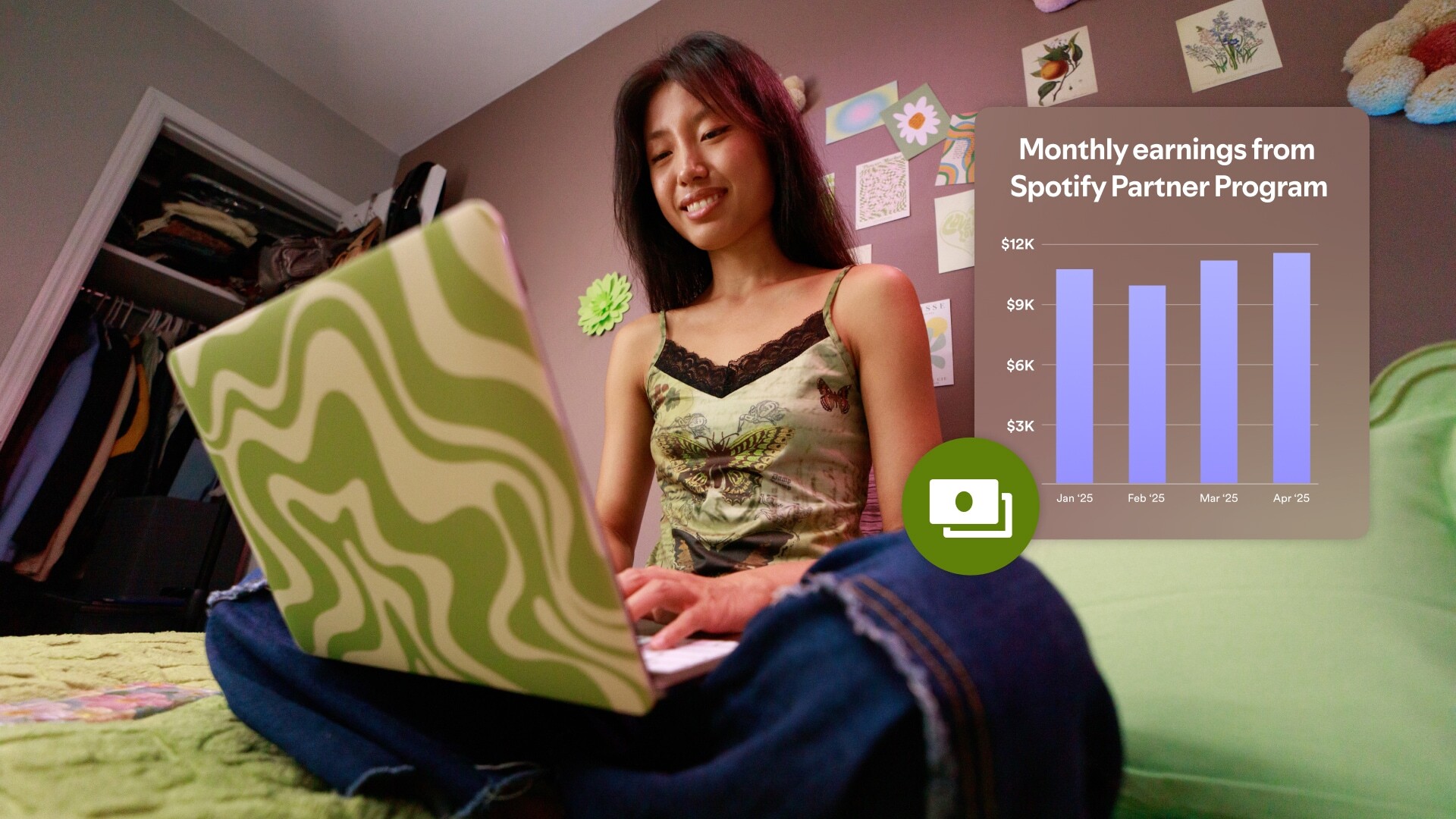
Earn with the Spotify Partner Program. The Spotify Partner Program allows eligible creators to earn consumption based video revenue. When Spotify Premium members in select markets stream your video episodes, we make sure they have an uninterrupted viewing experience by serving your show to them without dynamic ads. For those streams, instead of earning ad revenue, you can earn based on how much your fans stream your show."
For all other streams on and off Spotify you can earn a share of revenue from any ads played on your episodes. You just tell us where you want the ads to play and we’ll take care of the rest.
Launch subscriptions. Offer exclusive episodes or bonus video content to your most loyal fans in exchange for a monthly fee. Subscriptions help you create a sustainable income stream while deepening your relationship with your audience. Alternatively, if you already use platforms like Patreon or Substack, Spotify lets you integrate them, so your fans get access without friction.
Audio-only creators are adding video to get even closer to their fans. Video-first creators are finding new reach (and new revenue) by bringing their shows over to Spotify.
You don’t need a studio, and you don’t need to change your format. If you’re already creating content people connect with, you’re halfway there. Spotify is the next step towards building something that lasts.
A video podcast is a podcast that you can watch. It pairs the traditional podcast format (long-form conversation, storytelling, commentary) with a visual layer. That could mean filming your recording session, adding animations or visuals to enhance the story, or creating something entirely visual-first, like a video essay or tutorial.
Some video podcasts are full productions with multiple camera angles, studio sets, and edits. Others are as simple as hitting “record” on a phone while you talk. The common thread is that viewers can both hear and see the show.
How do I make a video podcast?
Making a video podcast is more accessible than you might think. A lot of the podcast equipment will sound familiar, as will aspects of the editing process. The process goes something like this:
Plan your content: Whether it’s interviews, solo commentary, or something more visual, know your format and what kind of value you're offering.
Record video and audio: You can film using a smartphone, webcam, or camera.
Edit your footage: Trim for pacing, sync audio and video, and add transitions or graphics.
Publish to Spotify: If you host your podcast on Spotify for Creators, you can upload your video episodes directly.
The most important thing is starting with what you have. Many creators begin with one camera, one mic, and a quiet room.
Is a video podcast worth it?
Yes, adding video is absolutely worth it if you want to deepen fan connection, increase discoverability, and repurpose your content across platforms.
Video podcasts let your audience see your personality (your reactions, body language, and setup), which helps turn passive listeners into loyal fans. For creators who are already making video elsewhere, bringing it to Spotify is a low-effort way to expand their reach.
What types of video podcasts are there?
Video podcasts are flexible, and that’s what makes them powerful. A few common types include:
Face-to-camera conversations and livestreams: The classic podcast setup. Whether solo, with a co-host, or interviewing guests, this style gives fans a front-row seat to your expressions and reactions.
Visual storytelling: Think video essays or narrative podcasts enhanced with graphics, slides, or B-roll. These shows often focus on education, commentary, or personal stories.
On-the-go shows: Vlogs, IRL interviews, or travel-based content that blends podcasting with movement and location changes.
Hybrid formats: A mix of in-studio filming and supplemental visuals, like reaction clips, tutorial cutaways, or screen sharing.
The only rule is to make it your own. If your show works in audio, it can probably work on video.
What is the best platform for a video podcast?
The best platform is one that meets you where you are and helps your content grow. For many creators, that’s Spotify, because they get:
One upload, two experiences: On Spotify, your audience can choose to watch or just listen. There’s no need to split your focus or create separate edits.
Built-in monetization: Spotify offers dynamically-inserted ads, Premium video revenue for Spotify Partner Program eligible shows, and subscriptions, so you can earn without chasing sponsors or building custom pipelines.
Massive reach: There are over 300,000 video podcast shows live on Spotify, and video podcast viewership has grown 40% year over year.
Fan engagement tools: You can use comments and polls to interact directly with your audience, gather feedback, or shape future episodes.
Creator-first tools: Upload, manage, and track performance all in one place.





%20(1).jpg)


.jpg)

