Search engine optimization (SEO) is the practice of making your content easier to find. For podcast creators, that means showing up when someone searches for a topic you cover, whether it's on Google, Spotify, or, increasingly, AI-powered answer engines.
Words matter: How to get your podcast SEO right
August 26, 2026
Learn how to make your show or podcast easily discoverable and increase your exposure with a strong SEO strategy.

Expand for key takeaways:


No items found.
Well-implemented SEO puts your show in front of audiences who are already looking for what you make. If you’re looking to increase the discoverability of your podcast via organic search, this guide covers everything you need to perform well in an unpredictable podcast search market.
Get the metadata fundamentals right
Metadata is the information attached to your show and episodes: the titles and descriptions that search engines use to understand, classify, and present your content in results. Titles tell search engines and listeners what your show and episodes are called and what they cover. Descriptions give them more context: who you are, what topics you explore, and why someone should listen.
Getting metadata right is the foundation of podcast SEO. Here's where to start:
Optimize your show title for search
Naming your podcast is a crucial SEO decision. A clever or quirky name might feel memorable to you, but if it doesn't mean anything to someone who's never heard of your show, it won't help people find you. On the other hand, a show title that's too generic gets buried. If dozens of podcasts have similar names, search engines have a harder time surfacing the one a user is actually looking for, and podcast fans scanning results have a hard time telling one apart from another.
A title that's unique, short, and memorable is easier for algorithms to identify, easier for podcast fans to recall, and easier to find when someone searches for it by name.
When brainstorming your podcast name, skip the following:
- Common or colliding names: A title like "The Business Podcast" competes with hundreds of shows using the same words, making it nearly impossible to rank for your own name.
- Unique spellings and special characters: "The Cooking $how" might look clever in print, but special characters confuse search algorithms and make the show harder to find when someone types the name into a search bar.
- Long titles: Longer titles get truncated in search results and on mobile screens. They're also harder to remember.
- Generic words: Words like "the," "podcast," or overly broad topic descriptors add length without adding meaning or searchability.
A unique, clever, or memorable title isn't enough on its own. It also needs to tell a potential listener what to expect. An inside joke or a clever pun might work well once someone already knows your show, but it won't mean anything to someone encountering it for the first time in search results, and won't give them a reason to click. If your title doesn't signal what the show is actually about, you're relying on your description to do all the work of convincing a new audience to listen.
Say you want to create a podcast that focuses on recipes and food and call it "The Cooking $how Podcast with Steve and Alicia." This title doesn't work because the name is too long, contains common or generic words, and has a special character. Instead, stick to these guidelines:
- Keep it short (three to four words).
- Avoid abbreviations, punctuation, and misspelled words that confuse the algorithm.
- Include a keyword that reflects your content.
- Be unique.
Olivia Lopez's "The Art Of Travel" is a great example of a name that works for search engines and audiences. The overall theme of the show is travel (keyword included in the title), but broader topics, like personal growth and sustainability, often come up in the show.
She didn't pigeonhole herself into a typical "travel" niche by calling the show something like "Travel Destinations." The title is also short, easy to remember, and works well within the SEO guidelines.
Write a keyword-rich show description
A keyword is simply a word or phrase someone might actually type or say when searching for content like yours. It could be a topic, a name, or a specific theme. The more naturally your show description includes the keywords your potential audience is already searching for, the easier it is for search engines to understand what your show is about and match it to the right listeners.
Your show description has three different readers, and each one uses it differently. Search engines crawl it for keywords to determine what your show is about and where to rank it in results.
Podcast platforms use it to categorize your show and match it to listeners through recommendations and search.
And AI-powered answer engines read it to decide whether your show is a credible source to cite when someone asks a question related to your topic. So, a description that directly answers common questions in your niche gives you a better chance of showing up in those responses.
New audiences most often find shows by searching a topic or a host's name, which is why both need to appear in your description. Beyond that, craft your description with these guidelines in mind:
- Make the first 250 characters count: That's what's visible in the Spotify app before a listener has to tap to expand, and it's often what gets pulled into search result snippets, too. Lead with the most searchable, descriptive language rather than saving it for later.
- Include your primary keyword: Your show's core topic should appear naturally in the description, not stuffed in, but clearly stated. This is what search engines and podcast platforms use to categorize and surface your show.
- Add related secondary keywords: Think about the specific topics, themes, and guest types your show covers. These help you show up for searches beyond your primary keyword and give AI answer engines more context about what questions your show can credibly address.
- Write in full sentences: Keyword lists don't read naturally, and AI answer engines in particular favor descriptions that are written the way a person would explain what the show is about.
Get inspired by this informative and succinct description from "Beyond the Screenplay":
"'Lessons from the Screenplay' creator Michael Tucker and the LFTS team do deeper dives into the storytelling of individual movies and chat with the creatives behind those films."
We have the host's name, podcast name, and keywords like “storytelling,” “movies,” and “films” to help search engines find, index, and deliver the podcast to the right audience.
Use episode titles to your advantage
Your episode title is pulling double duty. It needs to be informative enough for search engines to understand what the episode is about, and compelling enough for a listener to actually click.
Episode titles follow the same guidelines as show titles, but with one important addition: think about search intent. What would someone actually type into a search bar to find this episode?
“Grownkid” titles their episodes like search queries, because that's exactly what they are. "am i too old to have acne" and "do playful people go on better dates?" both mirror the way their audience actually thinks about and searches for these topics. That first episode could have been called something like "Navigating Adult Acne and Self-Acceptance." Technically accurate, but not how anyone searches.
Write episode descriptions that earn the click
Your show description broadly explains what your podcast is about. Your episode description needs to be specific. A few guidelines:
- Connect to the episode title: Search engines read your title and description together. If your title is "how to start a podcast with no equipment," and your description opens with "In this episode, we talk about podcasting," you've wasted the description's keyword real estate restating what the title already said. Instead, pick up where the title left off: "We cover free recording software, budget microphone alternatives, and how to get clean audio from your phone." Use the description to go deeper on the specific terms someone might actually search for.
- Be specific: Mention the guest's name, the exact topic covered, and any specific questions or themes the episode addresses. These are the terms someone might search for.
- Keep it tight: Three to four sentences are usually enough. The first 250 characters are what's visible before a listener has to expand, so lead with the most compelling and searchable information.
- Link where it's useful: Episode descriptions support links, so use them to point listeners toward related episodes, a guest's own show or website, or other resources mentioned in the conversation. This isn't a direct SEO lever, but it's a simple way to add value for readers and keep audiences engaged with your show beyond a single episode.
Poppy Newdick, senior product manager at Spotify, recommends letting the actual conversation guide your description.
"Topics are people's interests, and when people are interested in something, they will search for it. Think about writing your podcast episode descriptions after you've recorded your podcast; you never know where your conversation might go."
"SHE/HER/THEY with KITTENS" has great examples of discoverable, enticing episode descriptions.
Her KITTENS & KEHLANI episode description explains, "KEHLANI sits down with KITTENS to talk about their identity journey and coming to terms with being a lesbian, as well as how she's found peace as a human and artist in the public eye."
It’s a one-sentence informative teaser for the episode that features the guest's name and specific topics. Perfect.
Solidify your on-platform presence
When a listener finds your show through search, your Spotify profile is what converts that discovery into a play. How well it does that job depends on two things: how clearly you've signaled to Spotify's algorithm what your show is about, and whether your visuals are compelling enough to make someone click.
Optimize your show page
Your show page is what Spotify's search algorithm uses to categorize and surface your show to the right listeners, and it's what a potential listener lands on when they find you. Make sure yours includes:
- Category tags: When you publish your show, you choose one or more categories that describe what it's about, like true crime, comedy, or business. Spotify's algorithm uses these tags to categorize your show and match it to audience interests. Choose tags that reflect what your show actually covers, not just the closest available option.
- Your name and show title: Both should appear clearly so your show is findable by host name and topic.
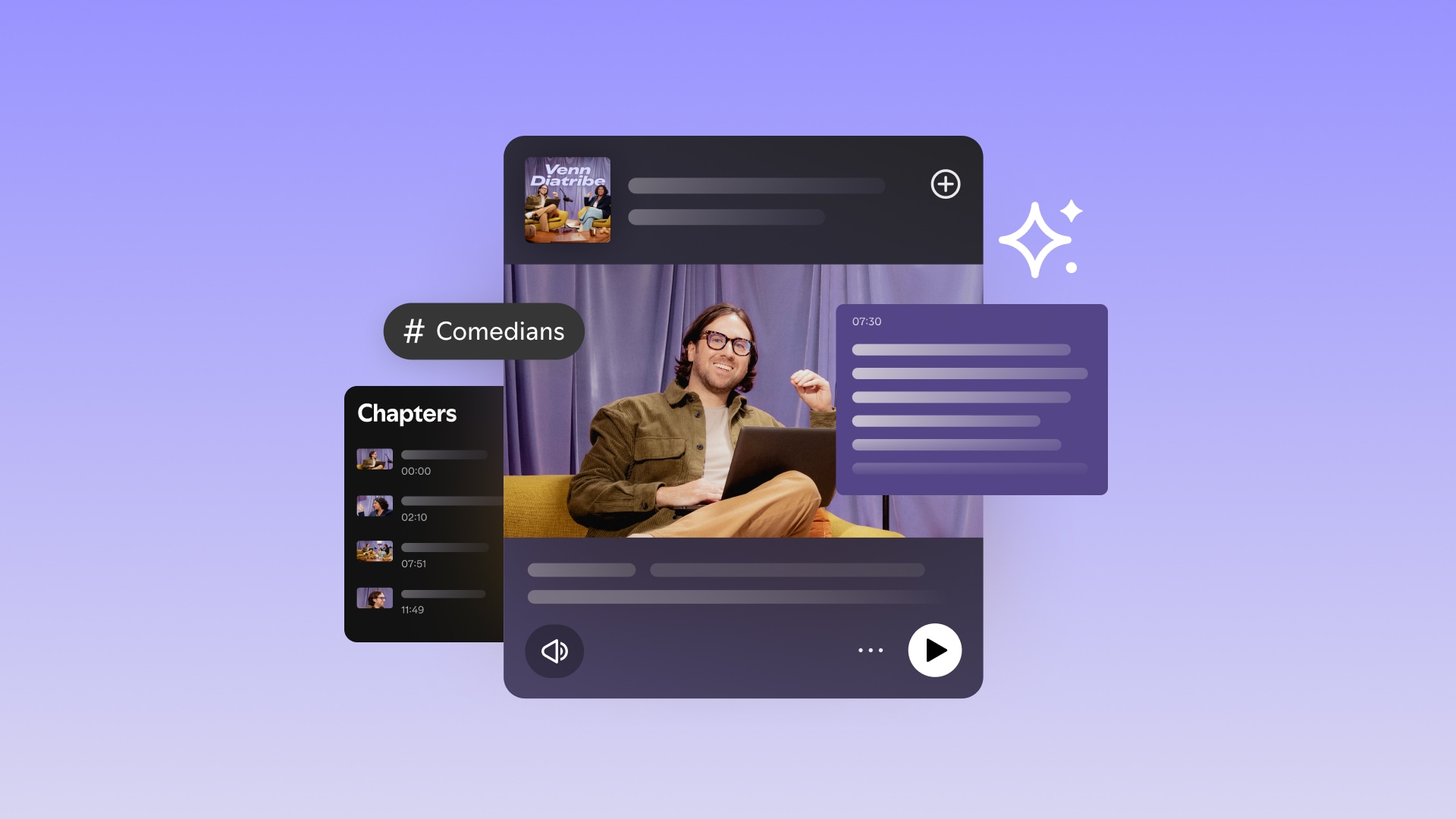
Beyond the basics, Spotify now automatically generates transcripts, chapters, and guest and topic tags for every eligible episode. Transcripts give Spotify's systems a full-text version of your episode to index, making your content discoverable at the topic and keyword level rather than just the title and description level.
Chapters break your episode into segments that can be recommended independently on Spotify surfaces. Guest and topic tags appear on your episode page and help listeners find your episode from other shows featuring the same guest or topic.
These features are automatically generated for eligible episodes. Turn transcripts on if they're turned off, and review them regularly. Accurate chapter labels and topic tags signal to Spotify's algorithm exactly what your episode is about.
Optimize your visuals
Visuals don't get indexed by search engines the way text does, but they affect click-through rate: the percentage of people who see your show in search results and actually click. Click-through rate is a signal that both search engines and platform algorithms use to determine whether your content is relevant and worth surfacing. A weak visual can undo good metadata.
Your cover art represents your show everywhere it appears: in search results, on Spotify's browse surfaces, and in social shares. A listener scrolling past should be able to tell what your show is about without reading the title. Design your cover art to these specifications:
- 3,000 x 3,000 pixels
- Square format
- Clear, high-quality graphics or illustrations
- Visible podcast name at small sizes
The cover art for "Flow State," a podcast about focus, features a simple, vintage-inspired design with complementary colors and a front-and-center title that's immediately legible and on-brand at any size.
While cover art represents your show as a whole, thumbnails do the same at the episode level. A thumbnail that clearly communicates the episode topic, features a recognizable guest, or creates genuine curiosity performs better in search results than a generic branded image. And like your cover art, it needs to work at small sizes and communicate something specific at a glance.
Take advantage of Spotify's native tools for SEO
Optimizing your metadata and show page gets you indexed. But Spotify has a set of tools that go further, helping your show surface in places traditional SEO doesn't reach, including Spotify's own discovery surfaces and AI-powered search engines that pull directly from Spotify's content.
Use shareable links strategically
Spotify's shareable links give every episode, clip, and show page a direct URL that can be shared anywhere: social media, newsletters, websites, and show notes. Every external link pointing to your Spotify content is a signal that helps search engines understand your show's relevance and authority. The more your Spotify pages are linked to from external sources, the stronger that signal.
When sharing links, be deliberate. Share episode links when the topic is searchable and specific, clip links when you want to drive discovery of a particular moment, and show page links when you want to build overall profile authority.
You can create as many custom links as you'd like for your show or any episode, so consider creating a unique link for each social channel you post to. That way, you can compare clicks and conversion rates by channel and see which ones are actually converting into plays, not just driving traffic.
Build a podcast website
A dedicated podcast website gives search engines an additional place to index your show. When you publish on Spotify for Creators, an RSS feed — a standardized file containing all your show's metadata, episode titles, descriptions, and audio files — is what gets distributed to podcast platforms and crawled by search engines. But an RSS feed alone gives crawlers limited information to work with. A website gives them access to a richer set of content, such as your show description, episode summaries, guest information, and, crucially, show notes.
Show notes are where a podcast website earns its SEO keep. A well-written show notes page for each episode — including timestamps, topics covered, guest names and credentials, and links to resources mentioned — gives Google a structured, keyword-rich page to index independently. That means individual episodes can rank in search results on their own merits, not just as part of your show. A listener searching for a specific guest or topic your episode covered might find that show notes page before they find your Spotify profile.
A podcast website also opens up additional discovery channels. Newsletters, blog posts, and embedded players all give you more surfaces to reach potential listeners and more pages for search engines to find.
Get found in AI search with AEO
Search engine optimization gets you onto Google. Answer engine optimization (AEO) gets you into the responses that AI tools like ChatGPT and Google AI Overviews generate when someone asks a question.
When someone asks an AI tool, "What's the best podcast about personal finance?" or "Who should I listen to for marketing advice?" the AI doesn't return a list of links. It generates an answer and cites the sources it used to build that answer. The goal of AEO is to make your show and your Spotify presence one of those sources.
AI answer engines favor content that directly and clearly answers questions. The more your show's metadata, descriptions, and associated web content are structured around specific questions and clear answers, the more likely it is to be cited. A few ways to apply this:
- Write descriptions that answer questions directly: Instead of "a show about marketing," try "a show that answers the questions founders have about growing their business without a big budget." The second version mirrors how someone would phrase a question to an AI tool.
- Name your topics and guests explicitly: AI tools index named entities, people, companies, and concepts, and use them to match content to queries. A description that mentions your guest's full name, their company, and the specific topic you discussed gives AI tools more to work with than a vague summary.
- Structure episode content around clear, distinct topics: Episodes that jump between unrelated subjects are harder for AI tools to categorize and cite confidently. Episodes organized around a single clear question or theme are easier to surface for relevant queries.
Your Spotify presence feeds AI citations, too. Your show page, episode descriptions, and automatically generated transcripts are all potential sources for AI-generated responses. This means the work you've already done optimizing your metadata and show page in earlier sections is helping you rank on Google while also feeding the sources AI tools draw from when answering questions related to your topic. Write your descriptions and chapter labels as if you're answering a question because, increasingly, that's exactly how they'll be used.
Keep growing
SEO is an ongoing practice, not a one-time setup. Once your show is optimized, the next step is to understand how it's performing and use that data to keep improving. Explore these guides to keep the momentum going:
- How to grow your podcast audience
- How to measure podcast success
- Amplifying your show with automatic transcripts, chapters, and more
- Podcast marketing: 12 key strategies to promote and grow your podcast
Frequently asked questions about podcast SEO
Does having a transcript help with SEO?
Yes, transcripts are one of the most direct SEO improvements you can make. A full-text transcript gives search engines and AI answer engines a complete, indexable record of everything discussed in your episode. Without one, search engines are limited to your title and description. With one, every guest name, topic, and specific claim becomes searchable. Spotify automatically generates transcripts for eligible episodes. Turn them on and review them for accuracy.
How do I know if my podcast SEO is working?
Your Spotify for Creators dashboard is the best place to start. Look at where your listeners are coming from. If search is a growing source of new listeners, your SEO is doing its job. Pay attention to impressions and follower growth over time rather than expecting immediate results; SEO is a long-term play. For off-platform performance, Google Search Console can show you whether your show's website and show notes pages are appearing in search results and driving clicks.
Can private or subscriber-only episodes be indexed?
Generally, no. Private and subscriber-only episodes aren't publicly accessible, which means search engines can't crawl them and they won't appear in public search results. They also won't be indexed by Spotify's public search algorithm in the same way as public episodes. If discoverability is a priority, keep your best SEO-friendly content publicly available.
Does video help a podcast rank higher in search?
It can, but it's not guaranteed. Video adds additional discoverable surfaces — thumbnails, visual content, and stronger engagement signals — that can improve your chances of surfacing in search results. But video alone won't compensate for weak metadata, thin descriptions, or inconsistent publishing. The SEO fundamentals covered in this guide apply regardless of format; video just gives you more tools to work with.
Feeling inspired?
Unlock your show’s full potential on Spotify: download the optimization playbook
November 5, 2025
Text Link
Amplifying your show on Spotify with automatic transcripts, chapters, and more
September 9, 2025
Text Link


From 1K to 10K to 100K followers: What 4 creators learned from their growth journey
March 31, 2025
Text Link
How shows are using short-form video clips to drive podcast discovery on Spotify
March 25, 2025
Text Link


How creators are building their fan community on Spotify with podcast comments
September 16, 2024
Text Link

2024 Podcast Trends Tour: What creators can learn about monetization and growth
May 22, 2024
Text Link


%20(1).jpg)


.jpg)
SIMILAR CONTENT

