Starting a podcast or video podcast can sometimes feel a bit intimidating for new creators. And while there are plenty of step-by-step guides that walk you through the process, they often make it seem way more complicated than it actually is.
How to start a podcast or video podcast in less than an hour
July 8, 2021
Starting a podcast can sometimes feel a little intimidating. But what if you could get going in less than an hour?

Expand for key takeaways:


No items found.
In this article, we’ll show you how to start your podcast in less than an hour. You’ll get some practice with every step of the process and see how easy it is to create a podcast.
You can also check out our How To Start a Podcast Video here for tips and inspiration.
Gather your tools before you get started
To start your podcast, you’ll need a device to record the audio, one for video, and one to edit and mix it. You’ll also need a hosting service to upload your show, provide information about it (title, cover art, show descriptions), and distribute it to different apps.
In this quick and simple guide, we’re focusing on tools that many people already have at their fingertips:
- A smartphone or laptop to record your audio and video
Your smartphone or computer already has a microphone and camera that makes it easy to record your audio and video. You can either use your device’s native voice recording app and camera or record directly in the Spotify for Creators web browser with our integration with Riverside. - A smartphone or a computer to edit and mix your audio
Creators who host their show with Spotify for Creators can easily edit audio or video clips with Riverside in our web experience. - Spotify for Creators to host and manage your podcast
Spotify for Creators is Spotify's hosting platform that’s 100% free to use. We don’t have trial periods, hosting fees, or paywalls. Once you’ve created your Spotify for Creators account, you can start using it immediately to host, and distribute your audio and video content to the world.
Choose your podcast or show topic and format (10 mins)
What’s your show about, and how will each episode be structured? Those are the initial questions you need to answer when you’re starting a podcast.
Choose a topic that you’re passionate about. It’ll be easier for you to stay motivated as you create your show. It’ll also make it easier to find new episode ideas.
Looking for a podcast topic that speaks to you? Start here.
Next, identify the target audience for your show. This will help you choose a format and angle to make your show unique. For example, a podcast about cooking can be aimed at several different target audiences, including working parents who need quick recipes for the whole family, people who are cooking for the first time, vegans, pescatarians, and many more.
Finally, choose a format that matches your topic and audience. Your show’s format dictates how you’ll engage with your topic.
To continue with our cooking show example, if your target audience is working parents, you might want to go with a monologue format that shares recipes with them as quickly as possible since they may not have time to listen to a longer narrative-style show.
On the other hand, if your target audience is people cooking for the first time, you could opt for a more narrative-style show that guides listeners through the kitchen in real-time so that they feel less stressed about navigating unfamiliar territory.
Exercise: It’s your turn!
- List three topics you’re passionate about.
- Write down your ideal audience for each topic.
- Narrow down a topic and audience you’d like to move forward with.
- Select a format that matches your topic and your audience.
Outline your pilot episode (10 mins)
Your podcast outline is your roadmap for creating an engaging first episode that sets the tone for what listeners can expect.
Your show’s structure will be determined by the format you’ve chosen, and its tone will be determined by your topic and audience. Tone can be as simple as presenting your topic in a light and informal style or a more serious style.
Keep the following segments in mind as you outline your pilot episode:
- Intros — these segments feature introductions of yourself and your show. You could have a standalone intro that is the same for all episodes, or you could have a recurring intro to the show paired with one that’s unique to each episode.
- Music cues — these are points in the episode where you can use music to transition between each section. We recommend using Riverside's built in library of transitions in their virtual soundboard —these music tracks and sound effects are free, and you won’t run into any issues with copyright when you use them.
- Scripted segments — these are the segments of your episode where having a pre-written script can enhance your audience’s experience. In our cooking show example, this could be the history of a recipe you’re sharing in the episode or some context around a key ingredient that’s going in a dish.
Different podcast formats require different levels of scripted segments. Solo or monologue-heavy shows benefit from a lot of scripting prior to the recording process. By scripting their episodes, hosts can create a story arc that guides fans through their chosen topic. Interview-based shows need minimal scripting since the interview makes up the bulk of the show’s runtime.
Having scripted segments doesn’t mean you need to read those sections word-for-word while you record. They give you the opportunity to think through the ideas you want to share in these segments and make sure you hit all your topic points. You can adapt how you outline your scripted segments after you figure out what works for you.
- Interview segments — if you plan to include interviews in your show, there are a couple of ways you can outline your interview segments.
If your show is mostly interview-based, you can brainstorm interview questions for your first guest in this section of your outline.
If your show features a mix of scripted and interview-based segments, you can outline ideas for the types of soundbites you expect to get from your interview segments.
- Ad breaks — You can either edit a sponsorship you’ve sourced directed into your episode or use a free scalable ads solution like what is offered through Spotify for Creators.
- Outros — these segments appear at the end of your episodes, and you can use them to credit your team and shout out your social channels.
Not everyone wants to go ahead with producing their first episode so quickly, and that’s okay. Consider producing a trailer for your show to start experimenting. A trailer is a boiled-down version of your show—making one will give you audio production experience that you can use for your episodes.
Exercise: It’s your turn!
Write the outline for your first episode or your trailer.
Record your pilot episode (15 mins)
Now that you’ve written an episode outline, it’s time to record.
Start by choosing a recording-friendly environment. We don’t mean a recording studio or a soundproof booth. We’re talking about a comfortable room where you can reduce unwanted noises around you and you are happy with the background that will show up on camera.
If you choose to record in your bedroom or your closet, you’ll be in great company—many professional creators often do the same.
Try to minimize any sounds that might interfere with your recording. If you live with roommates or with a large family, let them know you’ll be recording, so they avoid making loud noises.
When you’re recording your episode, try to position your mic at the distance from your mouth suggested by the manufacturer; otherwise, you might sound distant and less engaging to your audience.
Interviewing a guest for your first episode? Here a few tips:
- Make sure your questions are prepared in advance.
- Pay close attention to your guest’s responses and have an active conversation.
- Ask open-ended questions.
- For remote interviews, try recording directly in your Spotify for Creators browser with our integration with Riverside.
Exercise: It’s your turn!
Record the audio and video you need for your pilot episode or your podcast trailer. Don’t be afraid to do multiple takes—that’s part of the process.
Edit your pilot episode (10 mins)
Editing is the most technical part of making your podcast, but you can create a high-quality edit in five quick steps:
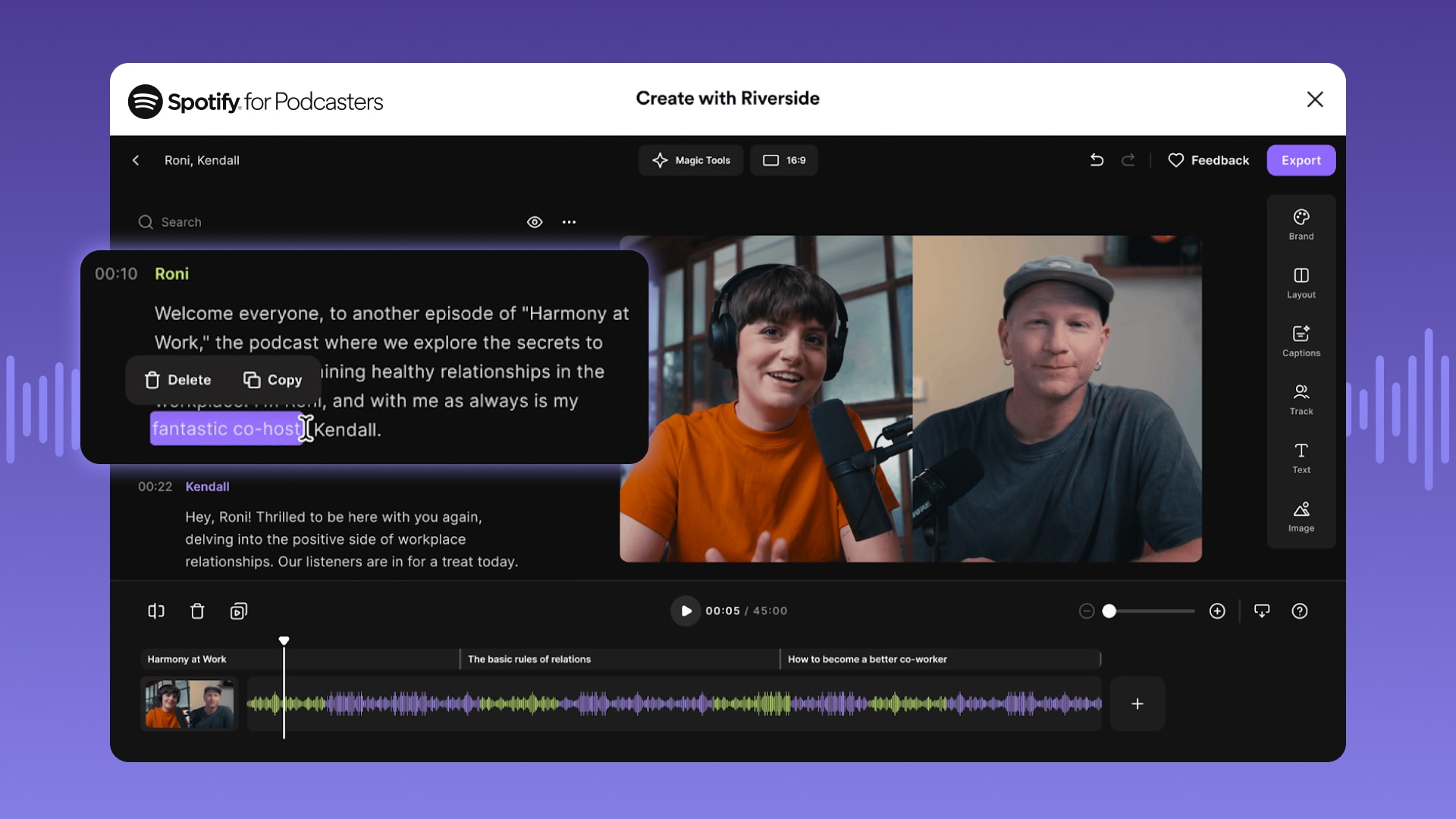
- Import your audio or video files into Spotify for Creators. Open our integration with Riverside (you can use your Spotify login!) and upload, cut, and trim your files down to the segments you want using their simple text based editing feature. You will see an auto-generated transcript from your audio or video files, and from there you can edit out words, phrases, or fumbles right in the text - they’ll be magically removed from your audio with seamless transitions. You can even move words around or reorder sections without touching the waveform files.
- Add background music and audio or video clips from Riversides’ virtual soundboard to add music and transitions to your episode.
- Finish your episodes and enhance your sound with easy to use AI-based Magic Tools like background noise removal, automatic pace setting, and more.
- Save your edited audio or video and it will automatically be uploaded to your Spotify for Creators account—you’re ready to publish!
Exercise: It’s your turn!
Edit the audio you recorded in the previous step.
Prepare your podcast for launch (5 mins)
Preparing your podcast or video podcast for launch involves sharing all the information that listeners see in their podcast app, including your show’s title, description, and cover art.
You can add your show information in Spotify for Creators—go to the Settings page in your account.
Your title should be short (30 characters or less) and match the show’s topic and format. Want a few tips on choosing a title? Check out our guide to choosing a podcast name.
Your description should also be short and reflect the tone of your show.
- Keep it under 100 words.
- Include links to your show’s social handles or website (if available).
- Pay attention to SEO here and include any keywords that are relevant to your show.
Looking for best practices for your cover art? Check out our article on creating cover art.
Exercise: It’s your turn!
Write your title and description in your Spotify for Creators account.
Publish and share your podcast (5 mins)
You’re at the finish line: Now that your episode has been edited and your show information has been entered in your Spotify for Creators account, you can share your podcast with the world!
It’ll take a couple of hours to a few days for your show to appear in every podcast app you choose to distribute to. Once your episode or show trailer is live, share it on your social channels and start getting the word out.
You might also choose not to share your show with the world just yet—only with your friends and family to get their feedback. That’s okay! You can take what you learned and apply it to your next episode or even another show.
So there you have it—we’ve walked you through the process of how you can start a podcast (including video podcasts!) in less than an hour. After reading this, we hope you can see that podcasting doesn’t have to be complicated.
The most important thing to remember when you start podcasting is to have fun. Your craeator journey will be much easier when you enjoy the process of making your show.
Exercise: It’s your turn!
Publish your podcast and share it with us at @spotifyforcreators!
Feeling inspired?
SIMILAR CONTENT


A studio tour with Bella Freud: The psychology behind “Fashion Neurosis” video setup
August 8, 2025
Text Link


How creators are elevating their podcasting process with AI—insights you need to know
September 22, 2023
Text Link

Podcast microphones: Types and techniques to sound your best in any format
September 15, 2023
Text Link


Funny podcast ideas: How to make a great comedy podcast (or sprinkle humor into your show)
May 23, 2023
Text Link


